Upload a 3D model and get every pocket, hole, slot, step, fillet and chamfer recognised — with dimensions, a highlighted image of each feature, a setup plan and a cycle-time estimate you can download as Excel.
No credit card for the pilotRuns in your browserSTEP / STP files
Cycle Time Estimator — feature overview
8 feature typesrecognised automatically
Every facemeasured: length, width, radius, area
3 / 4 / 5-axissetups counted from access directions
Excel reportwith an image of every feature
What it does
Quoting data straight from the CAD model
Stop measuring features by hand before every quote. The estimator reads the exact B-rep geometry in your STEP file and turns it into the numbers estimators need.
Feature recognition
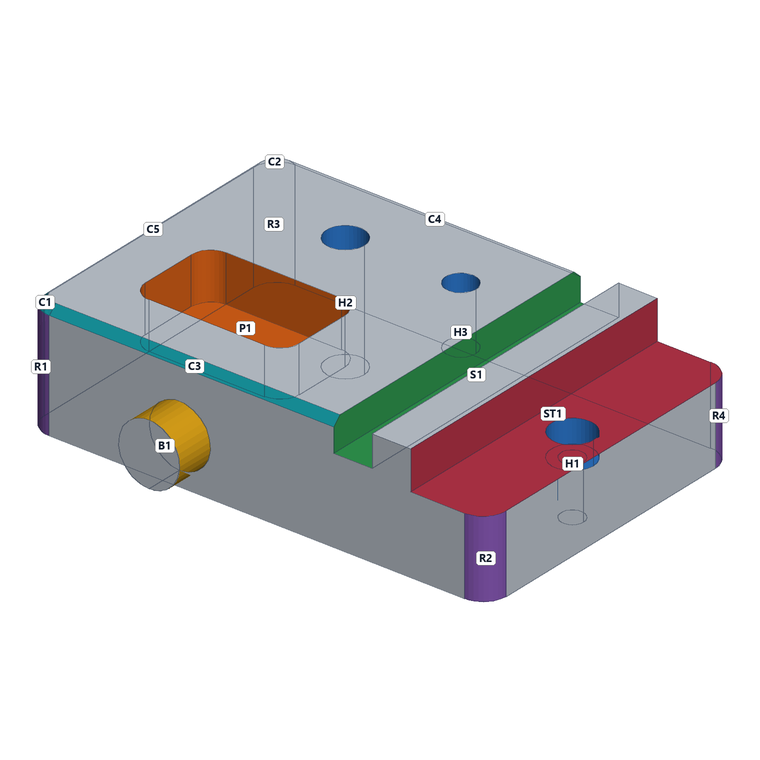
Through, blind and counterbored holes, closed and open pockets, slots, steps, internal radii, edge fillets, chamfers and bosses.
Dimensions for every feature
Length, width, depth, diameter, corner and floor radii, chamfer legs and angles — plus length, width and area for every individual face.
An image of each feature
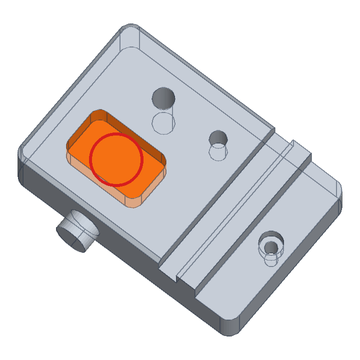
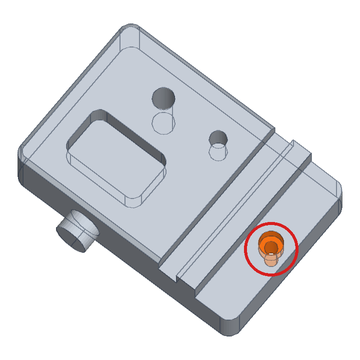
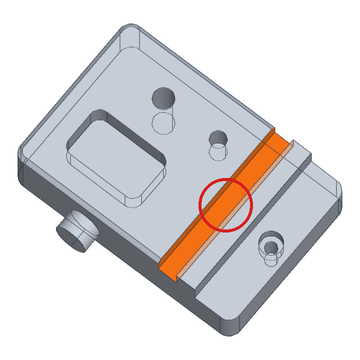
Each feature is highlighted on the part and circled, so anyone can see exactly what was measured. Filter by holes, pockets, slots and more.
Cycle-time breakdown
Roughing, finishing, hole making, chamfers and tool changes — each with the formula shown, by material and quantity.
Setup planning
Counts the setups a 3-axis, 4-axis or 5-axis machine needs from the directions features face, and flags compound angles.
Excel report
Summary, operations, features with images, face-by-face data and assumptions — ready to attach to a quote.
Example output
Every feature, shown and measured
Real output from a test bracket. The highlighted area is the feature; the ring marks where it is on the part.
P1Closed pocket40 × 25 mm, 12 mm deep, R5 corners
H1Counterbored holeØ6 through, Ø11 × 6 mm counterbore
S1Open slot80 mm long, 10 mm wide, 8 mm deep
How it works
Three steps, a few seconds
Nothing to install. Works in any modern browser.
Upload your STEP file
Choose material, quantity, machine rate and the processes you want to estimate.
Review features and images
See every recognised feature with its dimensions and a highlighted image, plus setups and the cycle-time breakdown.
Download the Excel report
Share the full analysis with your team or attach it to the quote.
Transparent estimates
You see how every minute is calculated
Each line states its basis — removed volume and removal rate, machined area and finishing rate, hole depths and drilling feed — so estimators can check it and adjust stock allowance, rates and setup time.
Roughing · 145.8 cm³ removed
0.97 min
Finishing · 329.5 cm² surface
3.29 min
Hole making · 3 holes
0.84 min
Chamfers · 291 mm
0.19 min
Tool changes · 9 tools
0.90 min
Cycle time per part · aluminium, 3-axis, incl. handling
8.20 min
Pricing
Try it for 6 days, then one simple price
Start the pilot with your own parts. No card needed — when it ends, buy a licence to keep using the tool.
STEP files (.step or .stp) of solid parts, up to 100 MB. Dimensions are reported in millimetres; STEP files in inches are converted automatically.
What happens when the 6-day pilot ends?
The tool is locked, but your account stays. Buy a licence from your account page and access is restored.
How accurate are the cycle times?
They are preliminary estimates for quoting, built from the recognised features, a stock model and per-material cutting rates. The basis for every line is shown so you can compare it with your own shop data. They are not a replacement for CAM-programmed cycle times.
Which features are recognised?
Through, blind (flat and drill-point) and counterbored holes, countersinks, closed and open pockets, closed and open slots, steps and shoulders, internal corner radii, edge fillets, blend fillets, planar and conical chamfers, and bosses. Every other face is listed individually with its dimensions.
Is my CAD data shared?
Files are processed on our server only to produce your analysis and are not shared with anyone. Contact us at sales@machinecycletimecalculator.com if you need files deleted.